Declarative Macro 的的语法请查阅 Macros By Example
定义
declarative macro 通过 macro_rules! 定义,与 match 的使用类似。下面是一个简单模拟 vec 宏的例子:
// lib.rs

#[macro_export]
macro_rules! vec {
    ( $( $x:expr ),* ) => {
        {
            let mut temp_vec = Vec::new();
            $(
                temp_vec.push($x);
            )*
            temp_vec
        }
    };
}
// main.rs
use macro_example;
fn main() {
let result = macro_example::vec![1, 2, 3];
println!("{:?}", result)
}这两段代码展示了 declarative macro 的定义与使用。例子简单模拟了 vec 宏,有个大致印象即可,后续会对各个部分进行讲解。
形式
declarative macro 借助“模式匹配”的方式发挥作用,宏的主体只是一系列规则。其形式如下:
macro_rules! macro_name {
	( pattern1 ) => { template1 };
	( pattern2 ) => { template2 };
}
当 rust 代码匹配了某个 pattern,则内容会替换为对应的 template。
pattern 和 template 是使用 () 包裹,还是使用 [] 或者 {} 进行包裹都是可以的,这对 Rust 来说并没有任何影响,下面三种定义是等效的:
macro_rules! macro_name {
	{ pattern } => { template };
}

macro_rules! macro_name {
	( pattern ) => ( template );
}

macro_rules! macro_name {
	[ pattern ] => [ template ];
}
这个规则同样适用于宏调用的时候,下面三种宏的调用情况是等效的:
let result = macro_example::vec![1, 2, 3];
let result = macro_example::vec!(1, 2, 3);
let result = macro_example::vec!{1, 2, 3};
虽然说用什么进行包裹对 rust 没有影响,但是在使用 declarative macro 的时候建议还是按照惯例来使用。在调用 assert_eq! 时使用圆括号,在调用 vec! 时使用方括号,而在调用 macro_rules! 时使用花括号。
Pattern
declarative macro 的 pattern 虽然形式上与 match 的 pattern 类似,但实际上是完全不一样的东西,因为 declarative macro 的 pattern 用来匹配 rust 代码,而 match 的 pattern 用来匹配值。
以开头的例子来讲解,宏 vec 定义的 pattern 为 $( $x:expr ),*。我们将这个 pattern 分开三部分来理解,第一部分为 $( $x:expr )、第二部分为 ,、第三部分为 *。
$( $x:expr )中的$()表示将捕获括号中定义的 pattern(即expr)匹配的值,并将值保存在$x这元变量中。expr表示定义的 pattern 用于匹配 Rust 表达式。- 紧跟在
$()后面的,它表示出现在被$()捕获的代码之后的逗号它可出现也可以不出现。 *表示 pattern 匹配的代码可以出现零次或以上。
pattern 更加深入的了解可以参考 Macros By Example。
Template
开头的例子宏 vec pattern 为 $( $x:expr ),* 对应的 template 为:
{
	let mut temp_vec = Vec::new();
	$(
		temp_vec.push($x);
	)*
	temp_vec
}
$()* 中的代码会生成零次或多次,这取决于 pattern 到底匹配了多少次。$x 则为 pattern 中定义的元变量。
例子中 vec![1, 2, 3],template 代码的实际生成为:
{
    let mut temp_vec = Vec::new();
    temp_vec.push(1);
    temp_vec.push(2);
    temp_vec.push(3);
    temp_vec
}
Repetitions
无论是在 matcher 还是在 transcriber,都将会重复出现的 token 放到 $(...) 中,并且后面跟着repetition operator。
$(...) 与 repetition operator 之间,可以选择添加 separator token。seperator token 可以是除了 delimiter 或者 repetition operator 之外的 token,一般常用 ; 或者 ,。如 $( $i:ident ),* 表示为任意数量被 , 分隔的标识符。
repetition operator 有 *、+、?,其含义跟正则表达式中的含义相同:
*表示任意数量的重复+表示最少一次的重复?表示为 optional fragment,可出现零次或一次
由于 ? 表示最多出现一次,因此不可与 separator 一起使用。因为最多出现一次的话,separator 就没有存在的必要。
每次匹配的重复内容,会存储到 matavariables 里面,例如下面的例子中,matcher 每次匹配到的表达式都会存储到 $x 这个 matavariable 中,并且可以在 transcriber 中使用:
macro_rules! vec {
    ( $( $x:expr ),* ) => {
        {
            let mut temp_vec = Vec::new();
            $(
                temp_vec.push($x);
            )*
            temp_vec
        }
    };
}
在 transcription 过程中,需要有一些限制来确保编译器正确展开 macro。
第一点是 metavariable 在 transcriber 中重复的次数、类型、嵌套顺序必须与在 matcher 中的一致。例如上面的例子中 matcher 是 ( $x:expr ),*,那么以下几种 transcriber 都是不合法的:
=> { $x } // 重复次数不匹配

=> { $( $( $x )* )* } // 嵌套顺序不匹配

=> { $( $x )+ } // 重复次数不匹配
第二点是在 transcriber 每一个需要重复的部分必须包含最少一个 metavariable 来决定需要展开多少次。如果多个 matavariable 出现在同一个需要重复的部分,它们需要绑定到相同数量的 fragment,例如下面的例子必须绑定相同数量的 $i fragments 和 $j fragments:
( $( $i:ident ),* ; $( $j:ident ),* ) => (( $( ($i,$j) ),* ))这就意味着
// 合法
(a, b, c; d, e, f)

// 展开结果:
((a,d), (b,e), (c,f))
而 a, b, c; d, e 不合法,因为这种情况无法正确展开,$i 与 $j 的数量匹配不上。
调试
The Little Book of Rust Macros - Debugging 中提到几种调试 macro 的方式,但原理都是一致的,都是查看调用 macro 的地方代码是否展开正确。
借助 Rust Playground
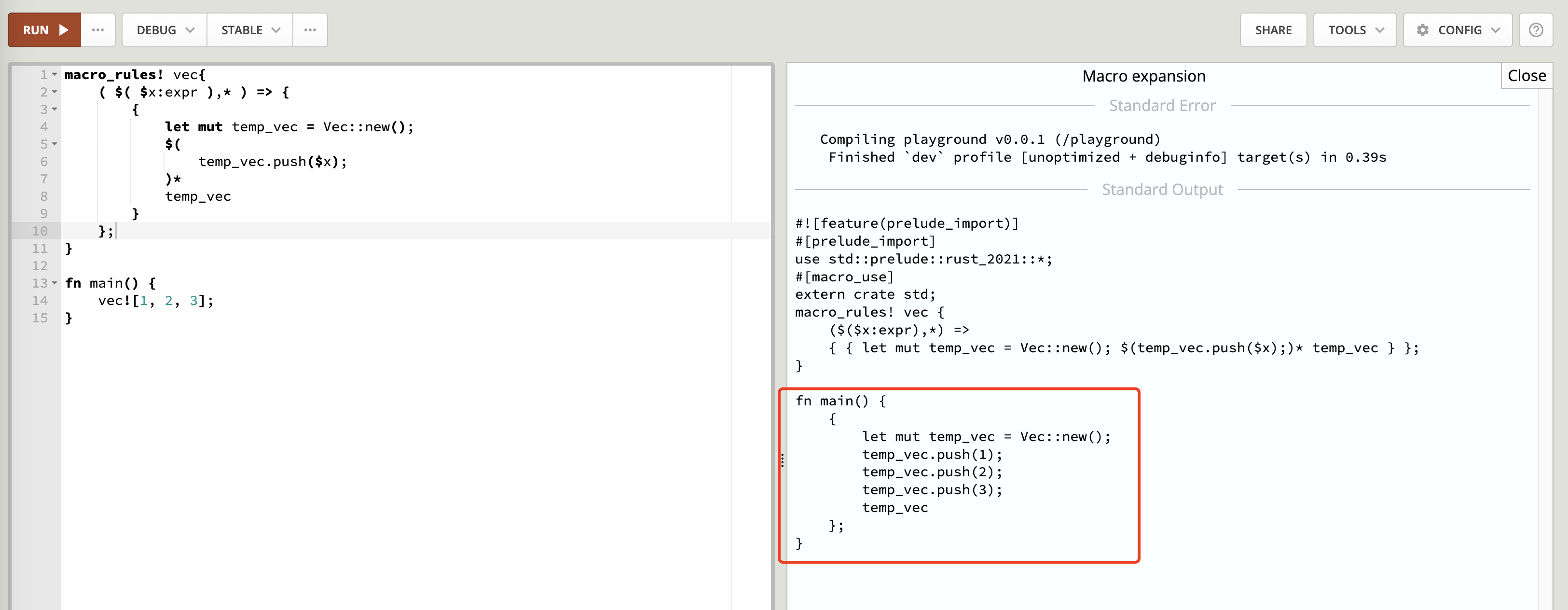
Rust Playground页面中,可以选择 “TOOlS” 中的 “Expand macros” 来查看 macro 是否展开正确

展开后的结果:
使用 cargo-expand
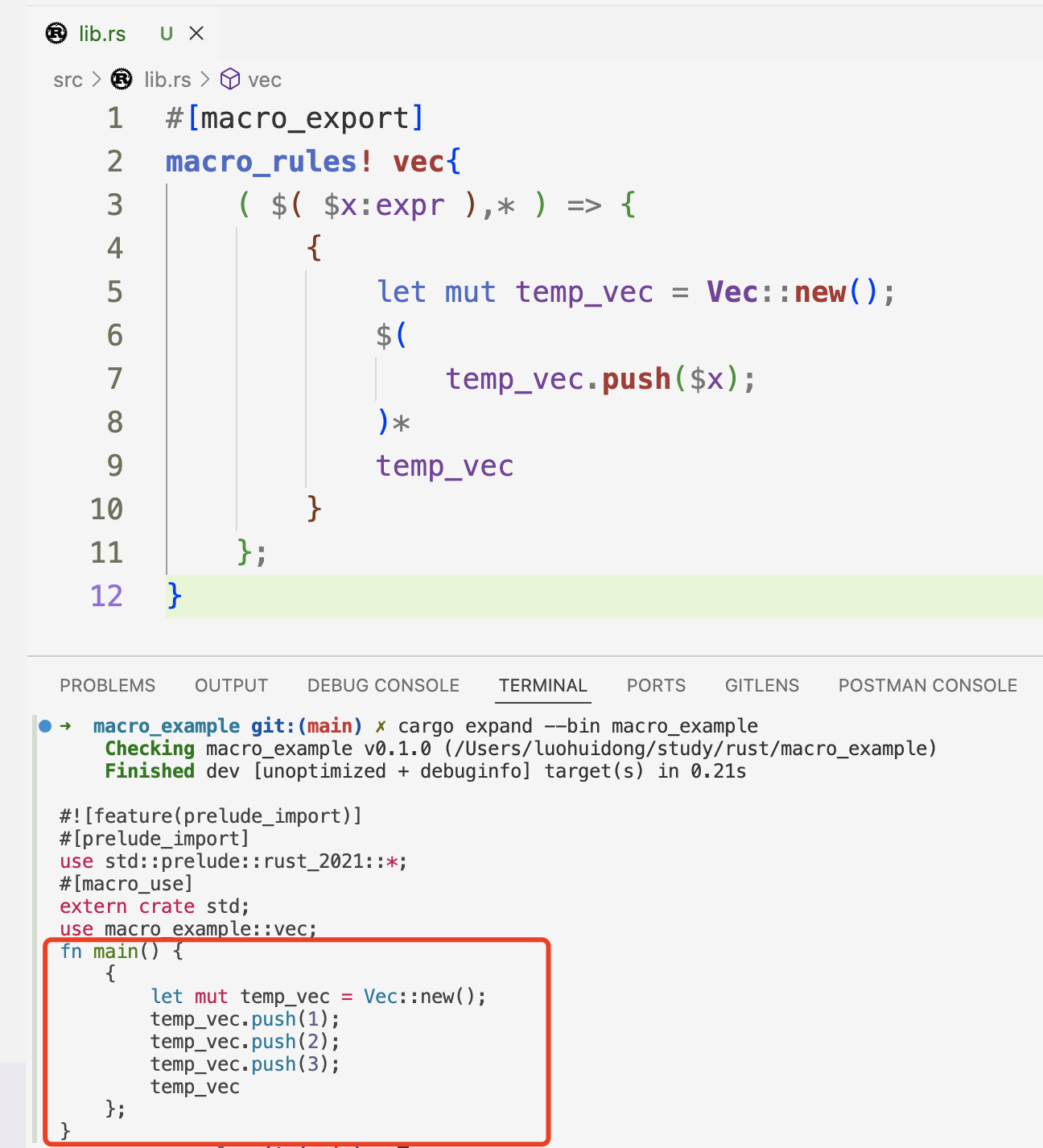
cargo-expand用于展示展开 macro 的结果,使用也非常方便:
导出宏
标有 #[macro_export] 的宏会自动变为 public,可以像其他语法项一样通过路径引用。例子:
// lib.rs

#[macro_export]
macro_rules! vec {
    ...
}
// main.rs
use macro_example;
fn main() {
let result = macro_example::vec!{1, 2, 3};
println!("{:?}", result)
}Hygiene
Hygiene 用于解决宏展开过程中的命名冲突问题。
默认情况下,在 macro 展开的过程,所有涉及的标识符都不会有任何变更。这些标识符会在 macro 调用的作用域中进行查找,这就导致如果这些标识符没法在作用域找到的话就会产生报错。而使用 $crate 则可以解决这个问题,$crate 可以用在路径开头来表示定义 macro 的 crate 的根路径。通过 $crate 就可以十分简便地使用当前 crate 定义的公共 item。
//// Definitions in the `helper_macro` crate.
#[macro_export]
macro_rules! helped {
    // () => { helper!() } // This might lead to an error due to 'helper' not being in scope.
    () => { $crate::helper!() }
}

#[macro_export]
macro_rules! helper {
    () => { () }
}

//// Usage in another crate.
// Note that `helper_macro::helper` is not imported!
use helper_macro::helped;

fn unit() {
    helped!();
}